
Learn. Practice.
Contribute.
Open the window to infinite possibilities with the world’s only digital learning platform made for and by persons with vision impairment.
Be unstoppable, a productive employee, a valued family member and a delighted consumer.
Blimey 1.0 is no longer in service.
We are excited to bring you an enhanced learning experience with the all-new Blimey 2.0! Practice computer concepts and learn English spelling with improved features, exciting enhancements, and an even better overall experience. Download Blimey 2.0 using the button below and get started today!
To Download [Ctrl+F3]
Master English spelling the fun way with iSpell—learn, practice, and spell with confidence!
Funded by

65000+
users
16
countries

Sireesha Takilapati
“I had an opportunity to hire and work with visually impaired people and It was great to see how they can tab between screens to review multiple CVs at a time and make notes for screening process. Not only they switch between screens easily but also access multiple applications to update internal tools with the required info. Kudos to EnAble India in training them to utilize the existing aids/software that are helping to perform their tasks and making business as usual for them.”

Susan Scott-Parker
“BLIMEY!… but I am impressed with Blimey’s potential to scale & impact at the global level. This solution should be in the hands of every person with vision impairment wanting to engage confidently with the future of work”.

Dr. Homiyar Mobedji
“Thanks to Blimey, persons with vision impairment can now learn computers without much dependency on expert trainers. It’s the easy way of doing things.”

Dipendra Manocha
“The pioneering work done in developing pedagogy and building technology with empathy for promoting digital literacy has resulted in opening up private sector jobs in India for persons with vision impairment.”
The Story So Far
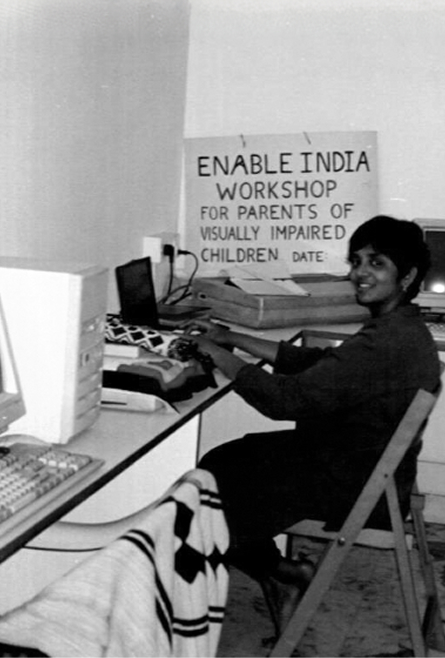
It all started in a 10X5 room with our founder, Shanti and her initial team of employees with vision impairment. The intent was clear. To make the visually impaired ‘battle ready’ for skilled jobs in the open labour market. How would this happen? By acquiring digital mastery on computers.
Today we are elated to see thousands of visually impaired people employed in varied computer-based jobs. They are working in the area of medical transcription, spam management, service management, program management, human resources and so on. Every issue that can pose a hurdle on the job, has been anticipated and converted into hundreds of ‘experiential exercises’ and ‘role simulations’. Jobs traditionally perceived to be ‘visual’ are no longer out of reach for the blind.
This tool is the secret sauce for gaining parity via digital mastery, and it’s available to each one of the 285 million visually impaired people living across the world. With contributions from all of you (our users) working in different arenas, we hope to build a tool that is shaped by the community’s knowledge and experience.
One of our trainers recalls teaching fonts to Parimala, who is blind by birth. She typed the first letter in size 20, second one in italics, and the third letter in a different font altogether. That’s when we realized that sighted perspective was key for achieving equity. Today such nuances and more, have been built into the computer exercises.
Our Vision and Purpose
What?
An open source platform enabling persons with vision impairment to learn computers!
Why?
To give equitable access to digital pathways that can improve quality of life!
How?
Opportunities to transform by gaining digital literacy and fluency!
Where?
Every person with vision impairment across the globe!
Who?
Led by the visually impaired community and supported by EnAble India!
400+
Experiential exercises
500+
Trainers and entrepreneurs
₹180,000
Highest salary for entry level job
Question Mark to Exclamation!

A visually impaired student used these powerful words to articulate the impact of EYE tool on his progressing career. This gave birth to the visual identity of Blimey in the shape of an inverted interrobang.
And what better brand name than ‘Blimey’ to express a delightful wonderment that this application brings to its users. The old English expression that originates from gorblimey is short for God Blind Me!

Four Pillars of Inclusive Learning
An accessibility-focused ecosystem empowering visually impaired users to navigate autonomous learning pathways with confidence, connection, and joy.
Our USP
- Responsive value stream
- Dynamic pedagogy
- Autonomous learning pathways
- Real-time mentoring mechanism
- Embedded sighted perspective
Our Users
- Adults who are born blind
- Adults who are late blind
- Children who are visually impaired
- Teachers of the visually impaired
Our Values
- Trustworthy & accepting
- Well-informed & robust
- Confident & equitable
- Playful & conversational
Our Promises
- Gives you companionship
- Inspires you to dream
- Encourages you to move forward
- Gives you a sense of purpose
Stories

“My digital skills are my passport to success” – Sooraj
I managed to explore work options in a large metro despite hailing from a small fishing village. I practiced tirelessly via Blimey exercises which resulted in my promotion from MIS Executive in a travel company with time sensitive targets. Process discipline, techniques of error proofing and sighted friendly national reports enabled my company to be a competitive start-up. My digital skills became my passport to transition into my current role with a nationalised bank.

“The Tool has encouraged me to dream bigger and aim higher” – Kanchana
For a visually impaired girl growing up in a small town in Andhra Pradesh, supported by a farmer’s income, higher education was a distant dream. But introduction to computers through this tool at an early age showed me a way forward. Through constant practice and automated feedback, I attained proficiency. Last year I managed to write my college exams on computer without the help of a scribe. This feat has motivated me to aim higher. I now aspire to appear for the civil services exams next year.

“This is a breakthrough solution that can help visually impaired students realize their full potential” – Sandesh HR
As a Master Trainer, I use this tool to give feedback on learner’s progress. Earlier it took me more than three hours to assess the students’ development. But with automatically generated reports, this tool helps me review their work in just five minutes. The insights gained over years have been packed into it. These will support the students in realizing their full potential and progressing on respective paths.
FAQs
What is Blimey?
Blimey is the world’s only digital learning collaborative platform made for and by persons with vision impairment. It assists persons with vision impairment to gain digital literacy.
What concepts can I learn on Blimey?
Blimey helps you learn how to use computers, operating systems, Microsoft Office applications and screen readers.
Learning areas currently include:
Fundamentals of Microsoft Word with NVDA
Fundamentals of Microsoft Excel
Fundamentals of Microsoft Outlook with NVDA
Fundamentals of Microsoft Outlook with JAWS
Fundamentals of Microsoft PowerPoint with NVDA
Fundamentals of Microsoft PowerPoint with JAWS
Windows 10 with NVDA
Windows 10 with JAWS
Magic of Screen Reader with JAWS
Moving Around Independently
English spelling through the Spelling Tool
And many more practical exercises
Do I need to pay anything to use Blimey?
No. Blimey is completely free to use.
What are the system requirements for Blimey?
For the Windows application, the currently provided minimum requirements are
Hard-disk space: 1 GB
RAM: 1 GB
A supported version of Windows
Blimey can also be accessed through its Web version or downloaded from Google Play and App Store for Android and iOS devices.
How do I download Blimey?
Choose the version suitable for your device:
Get It on Google Play
Open Blimey on the Web
Download Blimey for Windows
Download Blimey for Mac
How do I install Blimey 2.0?
Follow the step-by-step installation guide to download and install Blimey on your computer.
View Installation Guide (Add a video or link to product user guide)
How do I register on Blimey?
You can create a free Blimey account using your mobile number or email address.
View Registration Guide (Add a video or link to product user guide)
How do I log in if I am already registered?
Registered users can log in using either:
Mobile number or email address with a password
Mobile number or email address with an OTP
CTA: View Login Guide (add video or link t product user guide)
Contact Us
Need Help Using Blimey?
The Blimey support team can assist you with accessing the platform, installation, registration and login-related questions.